How to Engrave Keychains Using the xTool F1 Laser
Transforming Keychains: Your Start-to-Finish Guide
This post may contain affiliate links. As an Amazon Associate, I earn from qualifying purchases. Please see my privacy policy for full details.

Hey there, craft enthusiasts! Are you ready to elevate your DIY projects? Then, dive into the world of xTool F1 Laser Keychain Engraving with me! Together, we’ll transform ready-made wood and stainless steel keychains into personalized masterpieces using the xTool F1 Laser. Discover how simple and incredibly satisfying it is to bring your creative visions to life.
Grab Your Keychain Blanks, and Let’s Get Started
I’ve found the perfect keychain blanks for our project, saving you the search. These beauties are prepped and ready to become your next masterpiece. Grab them through the links I’ve provided. They’re completely prepped, so no need for any additional work on your part!
Wooden Keychain Blanks
Stainless Steel Keychain Blanks
DIY xTool F1 Laser Keychains with Ready-Made SVGs


The designs featured in my tutorial are pre-made and versatile, thus perfect for personalizing keychains with names, dates, or charming graphics. The links to the designs I used in the tutorial are listed below.
Engraving is a snap with these SVG files. Just pop them into the xTool software, resize them to fit your keychain, and you’re set. And don’t forget to dive into my treasure trove of freebies in my freebie library! My website is brimming with a vast collection of free SVG files, perfect for your next project or to spark some inspiration.
Where To Find Keychain SVG Files
As I mentioned in the video, I have a website full of free SVG files. Many are perfect for adding to your keychains! Listed below are the two I used and the link to where you can find the peeking animals bundle.
Thank You God
The Best Part of Me
Peeking Animals Bundle
xTool F1 Engraved Keychains
Creating keychains with my F1 was an absolute delight! Here’s a peek at the playful bunch I whipped up during my test runs for this video. They’re proof that a little curiosity and a lot of laser fun can lead to some pretty awesome creations. Can’t wait for you to take a look and get inspired!


What’s that font?
Ava & Jackson – Hello Rainbow
Owl text – Tippy Tappy Type

Step-by-Step Video Guide: See the xTool F1 Laser in Action

I’ve put together a step-by-step video tutorial to guide you through engraving keychains with the xTool F1 Laser. From start to finish, setting up your machine with the right settings, to the thrilling moment of unveiling your beautifully engraved keychain, I walk you through each step. This way, the tutorial is your all-access pass to kickstart your engraving projects with confidence.

I’d be thrilled if you’d pin the image above showcasing the xTool F1 Laser Keychain Engraving tutorial to Pinterest. Your support helps my blog grow and enables me to continue sharing insights and experiences with innovative tools like the xTool F1 that elevate our crafting projects. Thank you so much for your support. It means the world to me!

Curious about my first whirl with the xTool F1? Check out this blog post, where I dive into the unboxing experience. It’s all there: the giddy unboxing, easy-peasy setup, and my debut crafting projects, which range from engraving pencils to a charming tote bag and cute charms. Plus, a rundown on the coolest materials to laser with.
xTool F1 Laser
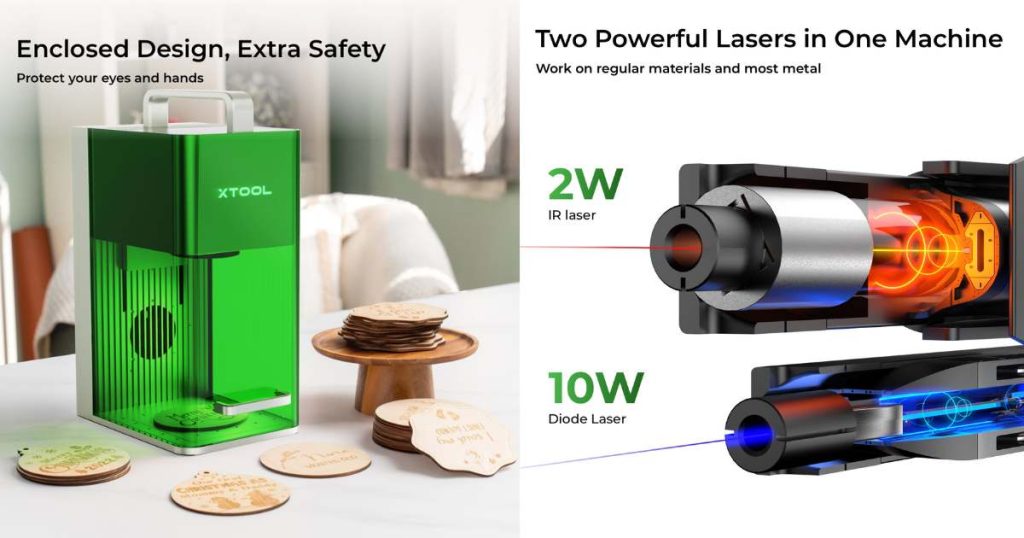
Ready to get your laser game on? Find more information here about xTool F1 laser! Use the code TRACY80 to snag $80 off any purchase of $999.00 or more!
Join the Creative Fabrica Membership

Fonts, designs, and so much crafty goodness! Over 16 million digital files are waiting! In partnership with Main Road Digital Creations, your first 10 downloads are totally free. After that? It’s just $47 a year (yep, that’s $3.99/month) with full commercial and POD use included. Sign up for Free!

I’m excited to see what you’ll make with this week’s Free SVG! I’d be thrilled if you joined our Facebook group to share your projects. Come be a part of our crafting community, where you can showcase your work, connect with fellow crafters, and find even more inspiration. Let’s celebrate the joy of crafting together!
Discover My Designs in Cricut Design Space
Are you a Cricut Access member? If so, you’re in for a treat! I’ve got a range of designs available in my Cricut Design Space profile that you might not have seen yet. Perfect for vinyl cutting, sublimation, and more, these designs are ready to add that extra flair to your projects. Take a look and find your next inspiration!



Follow My Cricut Design Space Profile