
Crafting Joy: Free Christmas Ornament SVG File | Cricut Tutorial
Crafting Festive Memories with a Free Christmas Tree Ornament SVG
This post may contain affiliate links. As an Amazon Associate, I earn from qualifying purchases. Please see my privacy policy for full details.

Free Christmas Ornament SVG File
The holidays are a crafting delight; making personalized ornaments for loved ones brings me so much joy. In this Cricut tutorial, I’ll walk you through making a festive bulb-shaped ornament using cardstock, heat transfer vinyl (HTV), and vellum. Plus, here’s the exciting news: this week, I’m sharing a Free Christmas Ornament SVG file tailored for all Cricut machines! Perfect for heartfelt gifts, whether for friends, teachers, neighbors, or babysitters.
Let the Light Shine: A Magical Glow with Vellum!

Discover the subtle brilliance of vellum! Wondering why I chose vellum for these ornaments? Here’s the secret: when paired with twinkling lights, the translucent beauty of vellum creates a captivating glow, turning your Christmas Tree Ornaments into radiant pieces. It’s all about adding that extra touch to your festive decor!
Can the Cricut Joy Xtra cut Vellum?

Curious if your Cricut Joy Xtra can handle cutting vellum? While there isn’t a specific preset for vellum on the Joy Xtra, don’t worry! I’ve got you covered. In the tutorial, I’ll guide you through creating a custom setting in Cricut Design Space, ensuring that cutting vellum becomes a breeze.
What Supplies Do I Need to Make Christmas Ornaments Using Cardstock?
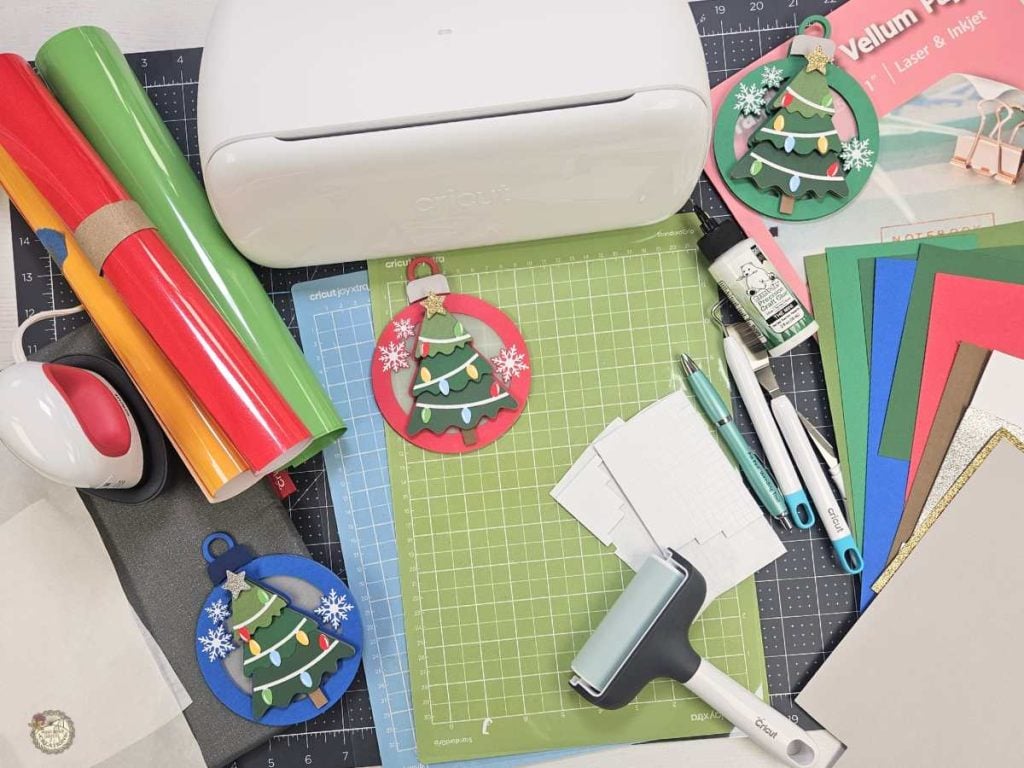
Wondering what tools and materials you’ll need to create these festive Christmas ornaments with cardstock? Check out the list below for all the supplies used in crafting these joyful decorations.
- Cricut Joy Xtra
- Light Grip Mat
- Standard Grip Mat
- Brayer
- Cardstock
- Most of the colors I used are 65lb. I did have one that was 80lb, and I used a small piece of glitter cardstock.
- Heat Transfer Vinyl (also called HTV or iron-on vinyl)
- Red, Green, Blue, Yellow, White
- Vellum
- Weeding Tools – Pin Pen
- Easy Press Mini
- Heat Resistant Mat
- Teflon Sheet
- Glue
- Foam Dots
- Twine
Personalize with Ease: Cricut Tutorial Featuring Free Christmas Ornament SVG File

In this Cricut Design Space tutorial, I’ll demonstrate how to bring your Christmas ornaments to life using cardstock, heat transfer vinyl, and vellum. Watch as I guide you through the process of personalizing your ornaments by adding a name and creating a custom setting for cutting vellum with the Cricut Joy Xtra. Let’s make this holiday season extra special with DIY personalized ornaments.
What’s that font?
The font I used in Cricut Design Space to personalize the Christmas Ornament is called Sundae.

I’m excited to see what you’ll make with this week’s Free SVG! I’d be thrilled if you joined our Facebook group to share your projects. Come be a part of our crafting community, where you can showcase your work, connect with fellow crafters, and find even more inspiration. Let’s celebrate the joy of crafting together!
All of the Free Files on my website are for Personal and Commercial use. Check out my Terms of Use (TOU) here.

I’d love it if you could take a moment to pin the Free SVG image above to Pinterest. By sharing, you’re helping my business grow, which allows me to keep bringing you the free SVG files you adore. Thanks a bunch for your support. It means the world to me!
Here’s where you can find your Free SVG Download
Design #183- Christmas Tree Ornament SVG is available in my freebie library. Get the Password by clicking the button below and Joining our Freebie Club!
If you enjoyed this week’s Free SVG & Cricut Tutorial here’s another you will love!

Check out My Shop
If my freebies have sparked your creativity, head over to my shop for even more SVGs to craft with. These are just a few of the designs waiting for you. Thank you for supporting my small business!



Join the Creative Fabrica Membership

Fonts, designs, and so much crafty goodness! Over 16 million digital files are waiting! In partnership with Main Road Digital Creations, your first 10 downloads are totally free. After that? It’s just $47 a year (yep, that’s $3.99/month) with full commercial and POD use included. Sign up for Free!